Chrome Extension Install
Project Blue has created a chrome extension to further enhance the messaging and make communicating even more frictionless, all while working directly in your own CRM.
1. Install the extension here or with this link below:
https://chromewebstore.google.com/detail/project-blue/bkhhglfciljiplgciljdnbmeeggefafa?pli=1
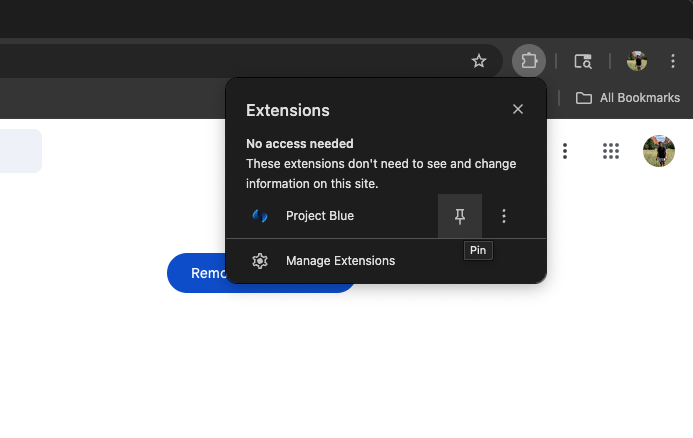
2. Toggle the extension by clicking the extensions in the top right & pinning it
3. Login to the extension using your Project Blue login credentials
4. To enable the Extension on a given page (like your CRM) you'll have to click it once to authenticate it
Stay signed in
The extension keeps its own login, which lasts 14 days. You sign in once and every new CRM tab works on its own, even after you restart Chrome. You don't need to keep a Project Blue tab open. If you don't use the extension for 14 days, sign in again.
If you keep seeing the sign-in card
Make sure you're on version 0.5.7 or newer. Older versions can send you back to the sign-in card in a loop, for example in GoHighLevel.
Open
chrome://extensionsin Chrome.Turn on Developer mode, then click Update.
Check that Project Blue shows 0.5.7 or newer.
Chrome rolls out extension updates over a few hours, so a new version can take a little while to arrive. Until it does, keeping one app.tryprojectblue.com tab open works around it.
Notifications
The extension's notifications only cover the lines assigned to you, and messages from blocked conversations don't trigger them. Duplicate notifications are removed. This needs extension version 0.5.4 or newer, so update the extension (see above) if you still get duplicates or alerts for lines that aren't yours.
Turn off the call or message icon
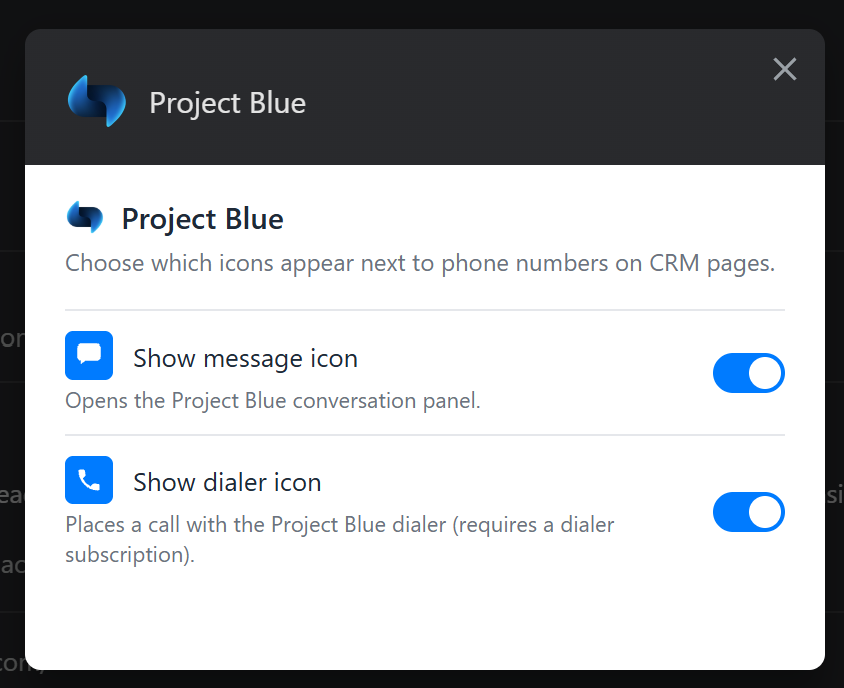
The extension adds a message icon and a dialer (call) icon next to phone numbers on your CRM pages. You can turn off either one, or both. For example, if you only want the message icon, turn the dialer icon off.
Right-click the Project Blue extension icon at the top right of Chrome and click Options. If you can't see the icon, click the puzzle-piece Extensions button and pin Project Blue first.
In the window that opens, switch off Show message icon, Show dialer icon, or both. The message icon opens the Project Blue conversation panel. The dialer icon places a call with the Project Blue dialer and needs a dialer subscription.
Go back to your CRM page. [CONFIRM: whether a refresh is needed.] The icon you turned off no longer appears next to phone numbers.
Switch the toggle back on at any time to bring the icon back.