
iMessage automation trigger
What is it? The iMessage automation trigger lets you fire a GHL workflow automatically when an incoming iMessage contains a specific keyword or phrase. Instead of relying on your contacts to interact with a generic SMS keyword, this works natively through your Project Blue iMessage line.
For example, if a lead replies "I want to buy" or "pricing", your workflow kicks off instantly — sending a follow-up, tagging the contact, notifying your team, or whatever action you have set up in GHL.
For CRM integrations such as GHL, we do not expose web-hook urls in our App to point towards a URL. Instead we utilize GHL's own native automations with the trigger to run workflows based on web-hook events (inbound and outbound messages).
If you're looking for Full API access - reach out to our support team in regards to this
Use cases
Trigger a sales sequence when a lead says "interested" or "ready"
Auto-reply to appointment requests when someone writes "schedule" or "book"
Tag leads and notify your team when a keyword like "pricing" or "quote" is detected
Route inbound messages based on intent keywords
How to set it up
In GHL, go to Automation and create a new workflow. When selecting a trigger, search for "Project Blue: Receive iMessage".
Set the Direction filter to Inbound so the trigger only fires on messages your contacts send to you.
Add a Message filter, set it to Contains Phrase, and enter the keywords you want to listen for.
Add your actions below the trigger — send a message, update a contact field, assign to a rep, or anything else in GHL.
Save and Publish your workflow.
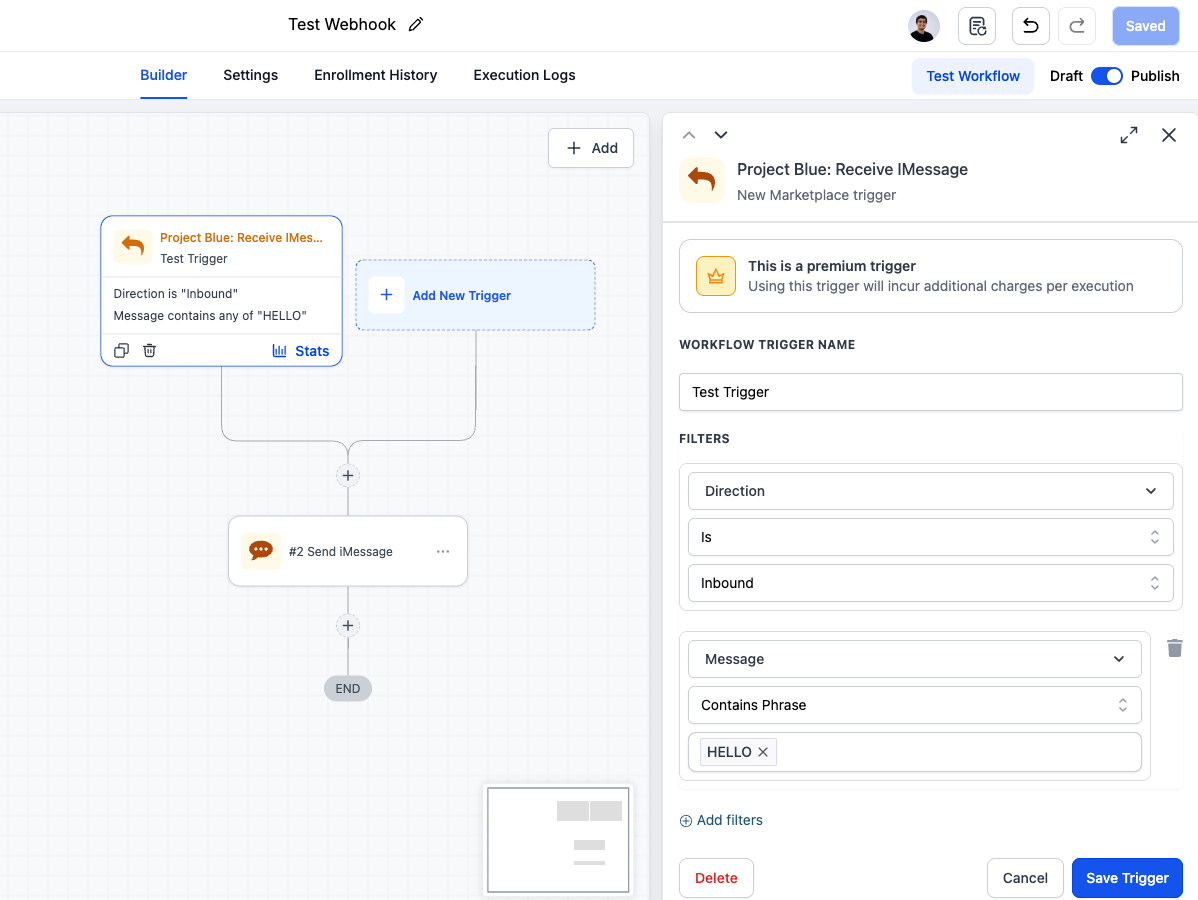
Example
Keywords configured: "I want to buy", "pricing", "how much", "ready"
When a lead replies with any of these phrases over iMessage, the workflow fires immediately and the GHL automation takes over.