
Call Recordings and Transcripts
Calls made and received with the Project Blue Dialer, including inbound dialing calls and FaceTime Audio calls, are recorded and transcribed automatically, so you can listen back and read what was said. There's no setting to turn recording off.
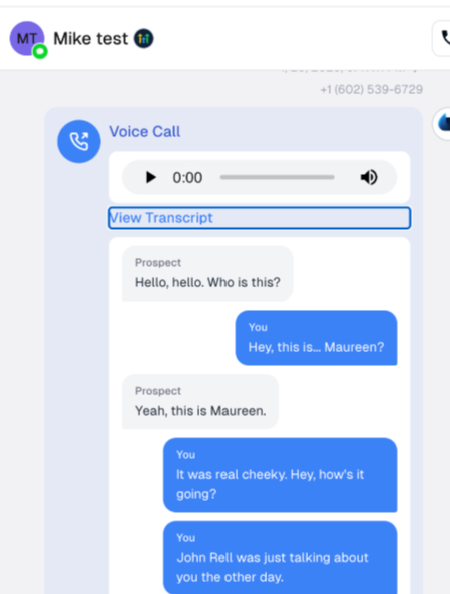
Where to find them
In Project Blue: open the contact's conversation in the web app. Each call shows in the thread, in time order, as a card titled Voice Call (or FaceTime Audio) with an audio player. Click View Transcript to read the transcript right there. The same card shows in the Chrome extension side panel and the HubSpot embed. You can't download recordings from the app yet.
In your CRM: Project Blue logs the call to the contact in GoHighLevel, HubSpot and Close.
GoHighLevel: a Call entry in the conversation with the direction, duration, disposition, recording and transcript.
HubSpot: a call log with the transcript, a link to the recording, the direction, the duration and an outcome based on the disposition, such as Connected or Left voicemail. If the number doesn't match a HubSpot contact, the call may not show on any contact's timeline. For inbound calls, accounts with Auto-Create turned on create the contact automatically.
Close: a call on the matching lead, only if Close sync is turned on for that line.
HubSpot and Close get a link to the recording, not the audio itself.
Which calls are recorded
Every Dialer call, including calls on lines with inbound dialing turned on. Inbound dialing is off by default, so inbound recordings only exist once you turn it on. See the inbound dialing article below.
Voicemails left on an inbound line are recorded too, up to 2 minutes.
Calls nobody answers usually have no recording.
Long calls
Transcripts work for calls of any length. Very long calls can take longer to show up, and the recording may not play in every place:
GoHighLevel only plays a recording inline up to about 4.5MB, roughly 10 to 12 minutes of call. For a longer call, the Call entry has no player. Look in the text of the entry for a line that says “Recording (too large for inline attachment)” with a link to the recording. The transcript is still posted.
In the Project Blue web app, a recording may not load if it wasn't saved. Try again, or contact Project Blue support.
Project Blue saves the recording before it transcribes the call, even if the call doesn't reach your CRM. In rare cases a recording isn't saved. If you can't find a recording, contact support with the contact's number, your Project Blue line, and the date, time and time zone of the call, and we'll look for it.